Short answer: To find items below minimum stock in Dynamics 365 Supply Chain Management, compare each item’s available inventory with the minimum set in its item coverage for that site and warehouse. InsightsCTRL builds that comparison from one question, such as “Which items are already below minimum stock?”, and can email it to the replenishment team every weekday morning.
What does “below minimum stock” mean in Supply Chain Management?
An item is below minimum stock when its inventory at a site or warehouse falls under the minimum quantity set in its item coverage. With the Min/Max coverage code, master planning replenishes up to the maximum level when projected on-hand falls below that threshold (Microsoft Learn).
A morning exceptions list answers a narrower question: which items are short right now, before master planning’s next run and before the first picks of the day. It is one of the reports described in our guide to AI reporting for Microsoft Dynamics 365.
Why do shortages surface too late?
In many warehouses, the first sign of a shortage is a picker standing at an empty location, by which point the order is late.
The information to prevent it is already in Supply Chain Management, but it is spread across screens:
- On-hand inventory shows quantities, not how they compare with minimums.
- Item coverage holds the minimums, one item and dimension at a time.
- Master planning proposes planned orders on its own schedule, often overnight, and those orders wait for a planner to firm them.
Teams fill the gap with an export of on-hand inventory and a spreadsheet lookup against minimums. That works until the export is skipped, a new warehouse is added or someone sorts the wrong column.
How do you build the list in InsightsCTRL?
One question produces the list. In the Contoso demo data, a replenishment planner asks: “Which items are already below minimum stock?”
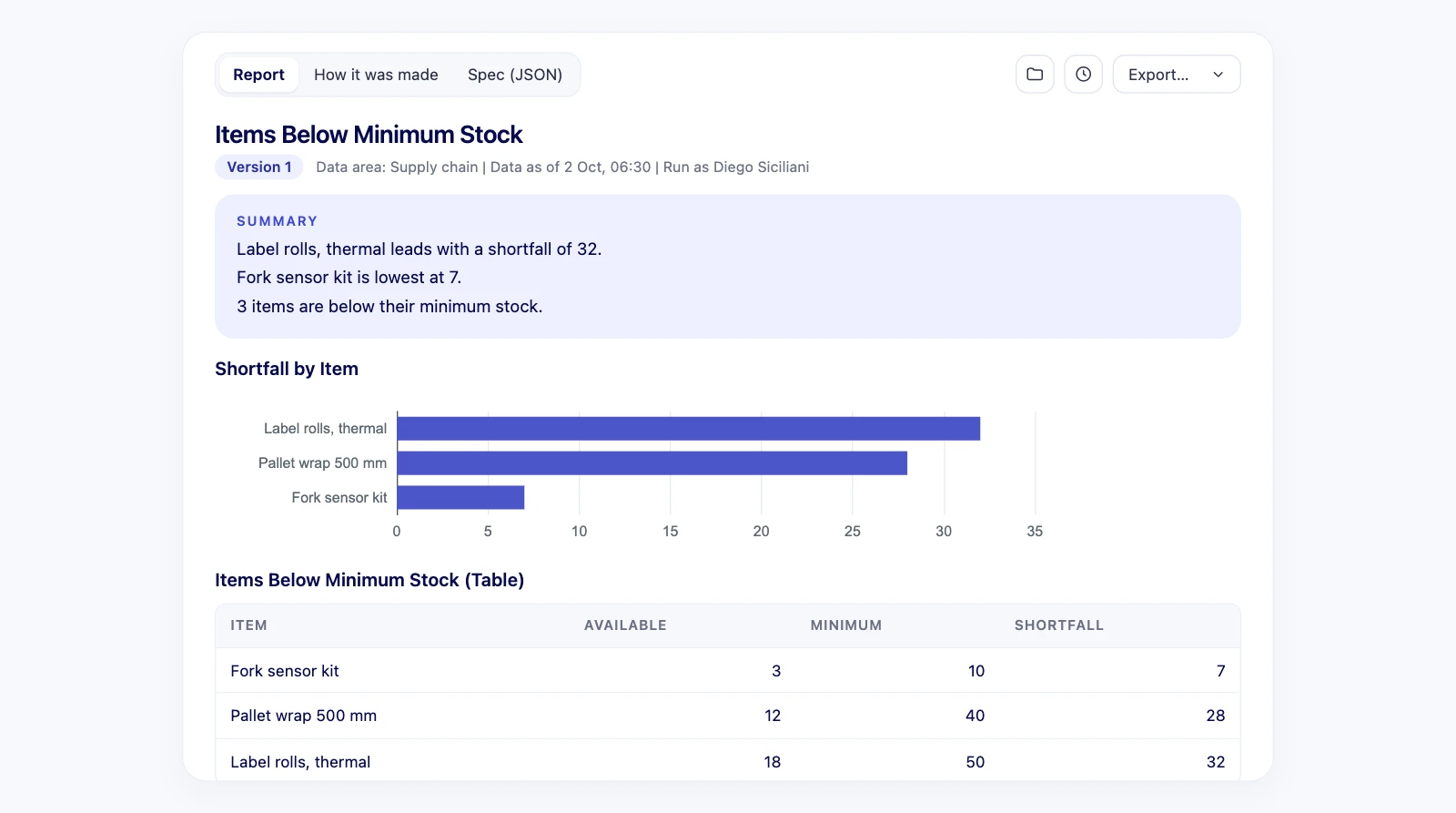
| Item | Available | Minimum | Shortfall |
|---|---|---|---|
| Fork sensor kit | 3 | 10 | 7 |
| Pallet wrap 500 mm | 12 | 40 | 28 |
| Label rolls, thermal | 18 | 50 | 32 |
The report lists three items, sorted by how close each is to running out. Fork sensor kit and pallet wrap are both at 30% of their minimum; label rolls are at 36% but have the largest shortfall.
The planner can narrow the list with a follow-up question instead of rebuilding it, for example “Group by warehouse” or “Show open purchase orders for these items.” Each follow-up saves a new version.
The planner then chooses Schedule, picks Every weekday at 07:00 and adds the replenishment team’s addresses. From then on, the list arrives before the first wave of picks, refreshed from Supply Chain Management on every run. Scheduling Dynamics 365 reports without rebuilding them each week explains how scheduled runs work.
Depends on: minimum quantities maintained in item coverage for each site and warehouse, and on-hand quantities kept accurate through cycle counting.
Should the list use on-hand, available or projected inventory?
Use available physical inventory for a morning exceptions list. It is on-hand inventory minus quantities already reserved for orders, so it shows what can actually be picked.
Physical on-hand overstates what is usable when stock is reserved. Projected inventory, which includes open purchase and sales orders, is master planning’s job; use it when the question is about next week, not this morning. Whichever you choose, state it in the report so the replenishment team knows which number they are reading.
How does the list fit with master planning?
The exceptions list complements master planning; it doesn’t replace it. InsightsCTRL has read-only access to Dynamics 365, so it never creates or firms planned orders. Planners use the list to decide which planned orders to firm first, which items to expedite and which minimums need review.
InsightsCTRL reports on Dynamics 365 Supply Chain Management, currently with early customers.
How do you keep minimum stock reporting reliable?
- Set minimums per site and warehouse. A single company-wide minimum hides shortages at the location that matters.
- Review minimums every quarter. Demand changes; minimums set two years ago may be too high or too low.
- Agree which quantity the list uses. Available, on-hand or projected should be a decision, recorded in the report.
- Send the list to the person who acts on it. If it goes to everyone, no one in particular is responsible for acting on it.
- Track repeat items. An item on the list every week needs a new minimum, a new supplier or a shorter lead time.
How should you roll the list out?
Pick one warehouse and confirm its minimums are current. Run the question for that warehouse, check the first list against what the team sees on the floor, then schedule it for every weekday morning.
For how InsightsCTRL builds and checks every report, read AI reporting for Microsoft Dynamics 365. To see the exceptions list built and scheduled on demo data, book a demo.